GMBRadar Local Search Ranking Scan Report: In-Depth Analysis Guide
Sunday, June 5, 2022
Lets analyse GMB Radar's Local Search Ranking Scan Report that is generated after every scan you perform on GMB Radar.
In this Local Search Ranking Scan Report Analysis by GMBRadar, we will dive into a comprehensive analysis, unravelling the four key components that shape your local SEO strategy. Be ready to get actionable Local SEO insights from Local Searches & Rank Information, and uncover the top 20 competitors influencing your local search landscape. Let's decode the essence of your GMBRadar Local Ranking Scan Report, that will help boost your local SEO game.
1: The Scan Summary
The scan summary shows the business information (name, rating etc.), your keyword, language and the time when this scan was performed. You can get an idea about how well your Local business has performed for this keyword, it shows the total locations where your business ranked, the average SERP rank and best SERP rank etc. You can also download this Local SEO Scan Report in PDF format or in excel/csv format. The pdf report will have all the information that is shown on this page including the rank map, you also add your company's log and name on this report, by default it will have GMB Radar logo on it. If you have performed this scan earlier also, you can compare scan by clicking the "View History" button. If you want to share this report with anyone else, click on the Share button and copy the share link.
2: Rankings Map
the rankings shown on map
In this map, your business location is showing as a blue pin with B letter, other round markers show what was your business rank from that location, each rank has its unique color, like 1–3 ranks have some shades of green, and 17–20 are in red .
You can click on any marker to view all the search results.
3: Searches & Rank Information
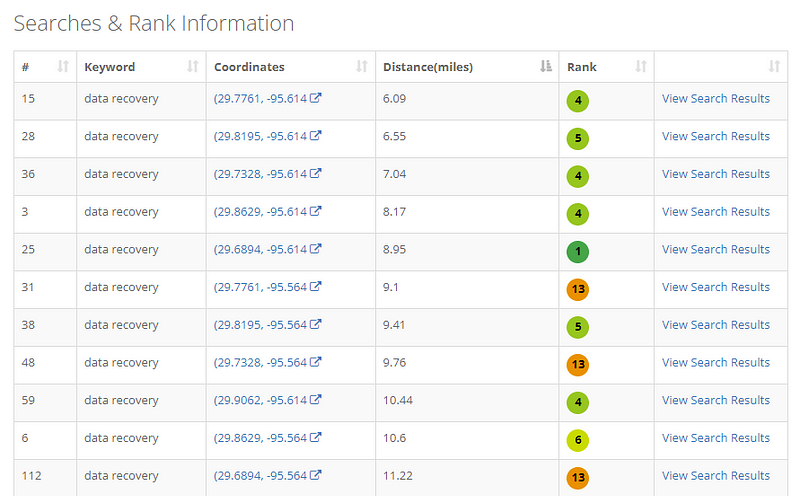
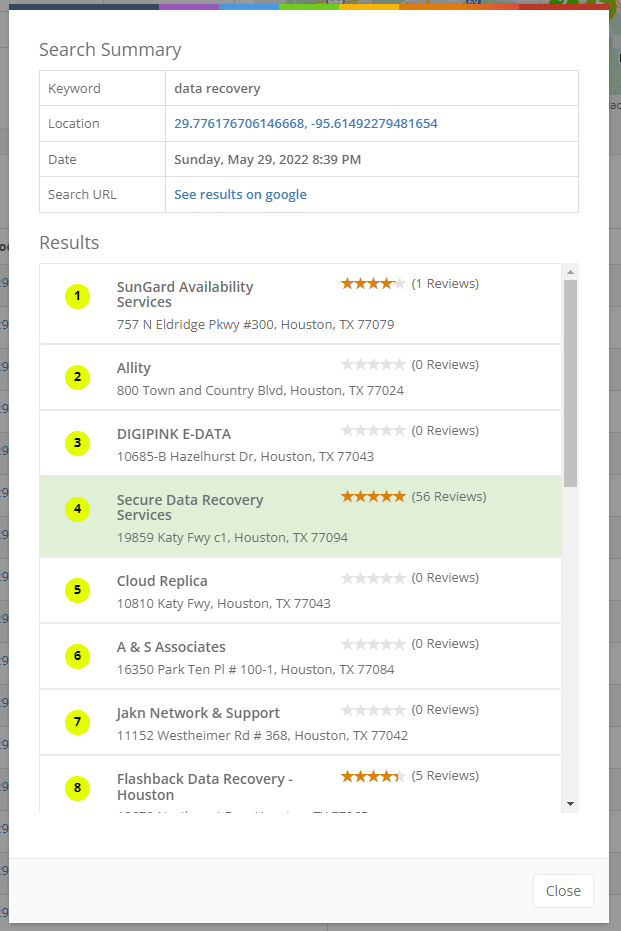
This grid has one row for each search, In this example we performed search from 121 locations so this grid has 121 rows, each row will have the keyword, location coordinates the distance from your business, your location’s rank and a link to view the search results. You can sort this grid by rank or distance. If you click on “View Search Results” it will show a popup with all business that appeared for this search, see the image below.
Search results popup
4: Top Competitors
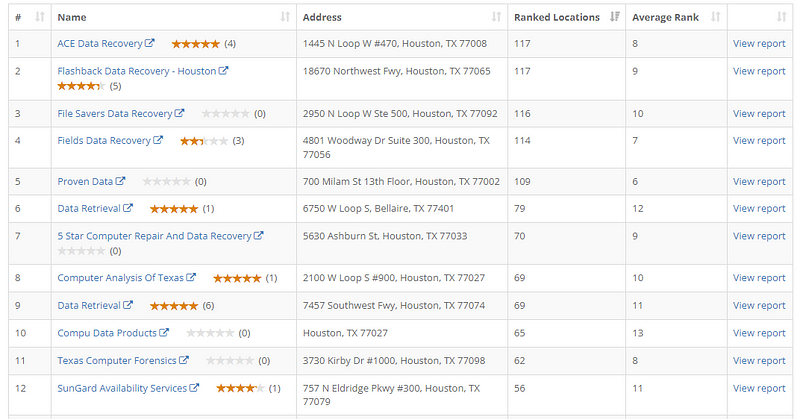
gmbradar scan, competitors report
This table will have your Local business’s top 20 competitors, for each competitor you can see their reviews, rating address, number of locations where it ranked and the average rank.. The “View Report” link will open a new page with same report as this one but it will be for this competitor, so you will know how this competitor is ranked for all locations.
Its a great tool to discover and analyze your competitors.
Related Tags:
5 min read
Try GMB Radar Free
Sign up today and receive 300 free credits instantly, with no credit card required.
Building a strong repository of reviews for your Google Business Profile involves a combination of providing exceptional service, actively engaging with your customers, and making the review process seamless. By implementing these strategies, you’ll not only enhance your profile but also establish trust and reliability among potential clients. Remember to ask for reviews politely, simplify the process, and always respond graciously to feedback—both good and bad.
As a local SEO specialist, you will no doubt be familiar with the importance of local SEO reports. GMB Radar's local ranking reports are the best way to demonstrate business is currently ranking and how campaigns are progressing and what aspects need more attention.
This blog outlines the Importance of Sharing Google review link and straightforward process of creating and sharing a Google review link, enabling businesses to easily collect reviews from customers and enhance their online presence.
 GMB Radar